How to install manual/loose mods
Guide by Maze
Note
This is a question I often get on discord, so it will have a page of its own
Step 1
All mods that do NOT come in .pak form goes into the game directory.
It will depend on the mod if it has to go inside the Data folder:
D:\SteamLibrary\steamapps\common\Baldurs Gate 3\Data
Or the Bin folder:
D:\SteamLibrary\steamapps\common\Baldurs Gate 3\bin
Or the root game folder:
D:\SteamLibrary\steamapps\common\Baldurs Gate 3
I chose to download a tattoo/make up mod. It will come in a .rar file

Extract the zip/rar file:
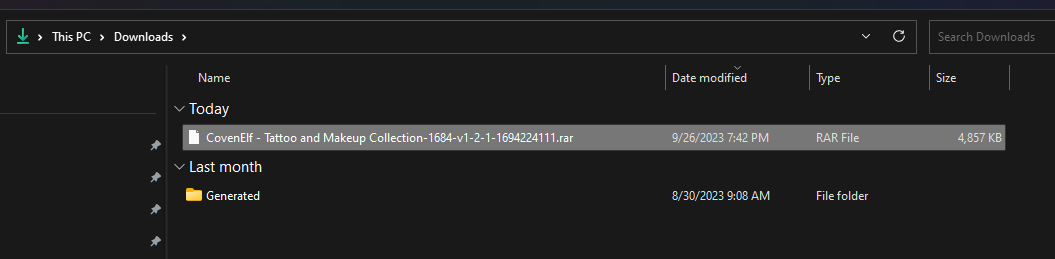
As you can see - a folder called “Generated” will be extracted. This particular mod needs to go into my Data folder (if you are unsure where it goes, please read the mod description, it will say which folder it goes into)
So find your data folder, then drag the file into the Data folder - like this:

That’s it! Now it’s installed.
Tip
If the file extracted from the rar/zip file is called Bin/Data it needs to go to the root folder: D:\SteamLibrary\steamapps\common\Baldurs Gate 3
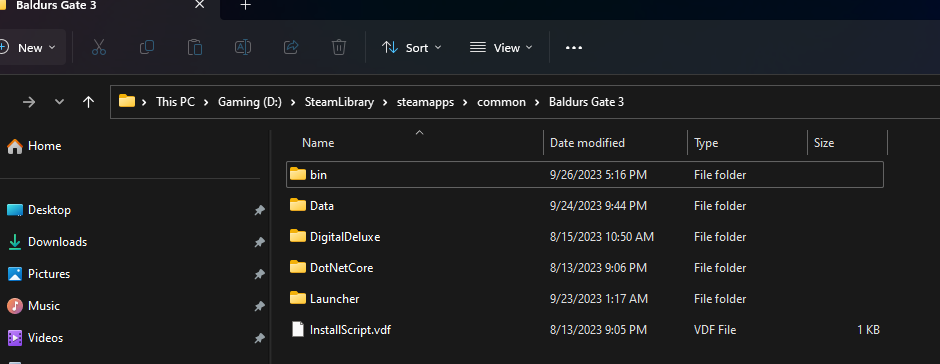
It will auto merge with the already existing folder
Tip
Some mods are installed differently such as Native mods & Party Limit Begone has other ways of installing. Refer to the mods description and the guides shown there.
Credits: Maze, Meowcat285
© Maze 2024, all rights reserved